



CPQ Administrator

The CPQ Administrator Certification caters to individuals experienced in implementing the Salesforce CPQ solution. This certification is intended for Salesforce customers, partners, and employees seeking to validate their skills and knowledge in designing, building, and executing quoting flows through the Salesforce CPQ platform. Upon earning this credential, Salesforce Certified CPQ Administrator will demonstrate proficiency in creating bundle configurations, pricing, output documents, and managing renewals and amendments.
Key facts
This information will assist you if you’re interested in becoming CPQ Administrator certified and includes an overview of the core topics in the exam.
There are 8 areas of knowledge that are covered by the CPQ Administrator certification.
Data table
| Objective | Weighting |
|---|---|
| Approvals | 4% |
| Product Selection | 7% |
| Quote Templates | 7% |
| Products | 11% |
| Orders, Contracts, Amendments, and Renewals | 15% |
| Pricing | 16% |
| Bundle Configurations | 17% |
| CPQ Platform | 23% |
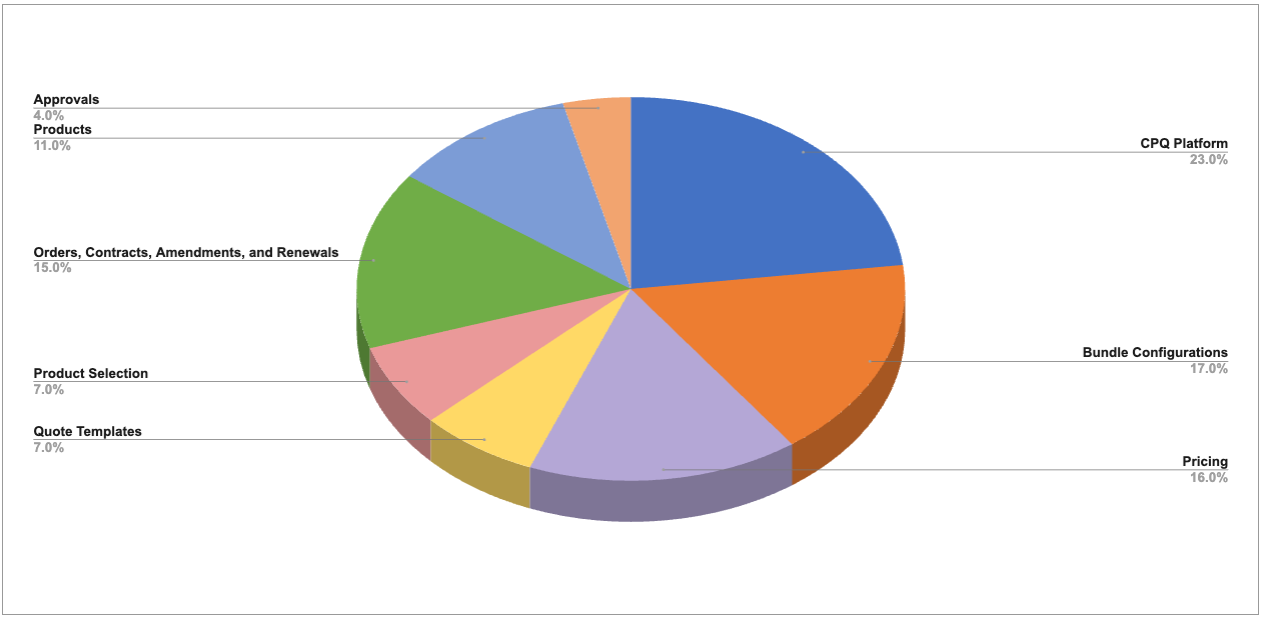
CPQ Administrator Topic Weighting Chart
CPQ Administrator
Certification Contents
The following are the core topic areas of the CPQ Administrator certification and what you’re expected to know:
CPQ Platform
This topic includes the following objectives:
Quote Line Pricing fields determine different price points like List Unit Price, Regular Unit Price, and Net Unit Price. The Price Waterfall is a multi-step process that utilizes Quote Line pricing fields to calculate the net price of a quote line; each price from top to bottom affects the next price down. The quote calculation sequence also applies to price rules. The sequence of price rules that use the same event can be defined using the Evaluation Order field. Similarly, the sequence of price actions associated with a rule can be defined using the Order field.
When configuring Salesforce CPQ, determining the necessary package-level settings is crucial for aligning CPQ features with business requirements. The Salesforce CPQ Package Settings Editor provides access to various tabs for configuring CPQ settings.
The Line Editor tab provides access to various settings for the Quote Line Editor, such as Actions Column Placement. The Pricing and Calculation tab can be accessed to enable real-time calculations and setting the Unit Price Scale. Subscription Term Unit and Subscription Prorate Precision can be specified in the Subscriptions and Renewals tab. The Require Approved Quote checkbox can be enabled in the Order tab to require primary quote approval before an order can be generated. Other settings include Product Results Group Field Name and Triggers Disabled, which are available in the Additional Settings tab.

Bundle Configurations
This topic includes the following objectives:

Pricing
This topic includes the following objectives:
In Salesforce CPQ, there are multiple pricing strategies to accommodate various business needs. Various pricing tools are available to adjust or replace the prices of products in price books. Block Pricing is used to calculate prices based on quantity ranges, while Percent Of Total Pricing bases product prices on a percentage of other products on the quote. Option Pricing allows setting a specific price when a product is sold within a bundle. Cost Plus Markup Pricing can be used to allow sales reps to add a markup value to a product’s cost. Contracted Prices can be created to set up account-specific prices.
In addition, various discounting tools are available to apply discounts to product prices. Discount Schedules can be created to establish volume-based discounts. A sales rep can manually specify Additional Discount, Partner Discount, and Distributor Discount. Pricing can also be set up for products sold as subscriptions. CPQ uses a prorate multiplier to calculate the prices of subscription products.
Quote Templates
This topic includes the following objective:

Product Selection
This topic includes the following objective:

Orders, Contracts, Amendments, and Renewals
This topic includes the following objectives:
In Salesforce CPQ, orders can be generated to track the products purchased by customers, while contracts can be generated to manage subscription products. The Ordered checkbox field on a quote automatically creates an order. Quotes can be split into multiple orders using the Order By or Order By Quote Line Group field, enabling more granular order management. The Edit Order Products button allows adjustments to deactivated and uncontracted orders. For subscription products, contracts can be generated from an opportunity or activated order by selecting the Contracted field. Certain conditions must be met to successfully contract from an order or opportunity. Steps can be taken to troubleshoot in case of failure.
Salesforce CPQ allows renewing and amending contracts and assets. A contract can be renewed when a customer’s subscriptions are about to reach its end date. The Renewal Forecast checkbox field can be selected to generate a renewal opportunity for forecasting purposes. The Renewal Quoted checkbox field can be selected to generate a renewal quote along with a renewal opportunity. The Renew Contracts button is available from the Contracts related list on account records to renew multiple contracts.A contract can be amended to add new products or update the quantities of existing products. The Amend button on a contract allows amending a specific contract. The Amend Contract button on an opportunity allows amending one of the active/evergreen contracts of the account. A percent of total asset that represents a subscription can be renewed using the Renew Assets button on an account record. The Amend Assets button allows amending the account’s assets.
In Salesforce CPQ, it’s important to understand when to use orders, contracts, subscriptions, and assets to manage sales processes effectively. An order can be created from a primary quote to track the products purchased by a customer using individual order products for each quote line. A contract can be generated from an opportunity or order to manage the subscription services purchased by a customer. Subscriptions provide detailed information about subscription products. The pricing, term, and type of a subscription can be set on its product record. Assets represent non-subscription products and can be generated per unit or quote line. Sales reps can be allowed to reduce their quantity on amendment quotes.

Products
This topic includes the following objectives:
In Salesforce CPQ, setting up products, price books, and price book entries is essential for defining products and their prices and ensuring that they are available for selection in the Quote Line Editor. Products can be set up as non-subscription or subscription products. A product record can be configured as a subscription, product bundle, MDQ (multi-dimensional quoting) product, or usage-based product. Products support features such as cost pricing, search filters, and image formula fields. Price books are used to define products and their prices. Each product must have an active price book entry in the standard price book, and custom price books can be created for different pricing strategies or customer groups. A single price book can be defined to track the prices of products in multiple currencies.

Approvals
This topic includes the following objective:
In Salesforce CPQ, the Advanced Approvals package provides a robust framework for managing complex approval processes, allowing businesses to set up Approval Rules, Approval Conditions, and Approver records tailored to their unique requirements. An Advanced Approvals process can be set up to route approval requests through serial or parallelApproval Chains. Approval requests can be sent to individual users or groups. When requests are sent to a group, approval can be required by only one or all the group members. Approval authority can be delegated to an alternate approver during a period of absence. Furthermore, approval requests can be routed dynamically based on the value of a custom field. For instance, they can be sent to the current user’s manager.