



Field Service Consultant


The Field Service Consultant Certification is specifically crafted for individuals with a background in implementing Salesforce Service Cloud and Salesforce Field Service. A certified Salesforce Field Service Consultant possesses the skill to design and implement solutions that align with customer business processes and meet their requirements. This involves utilizing the Salesforce Field Service product, managed package, and Salesforce Field Mobile application. The consultant is well-versed in the field service industry, holds expertise in mobile solutions, and demonstrates a comprehensive understanding of the Salesforce core object model.
Key facts
This information will assist you if you’re interested in becoming Field Service Consultant certified and includes an overview of the core topics in the exam.
There are 8 areas of knowledge that are covered by the Salesforce Field Service Consultant certification.
| Objective | Weighting |
|---|---|
| Configuring Maintenance Plans | 5% |
| Managing Assets | 5% |
| Permissions and Sharing | 5% |
| Managing Inventory | 8% |
| Configuring Mobility | 10% |
| Managing Resources | 16% |
| Managing Work Orders | 23% |
| Managing Scheduling and Optimization | 28% |
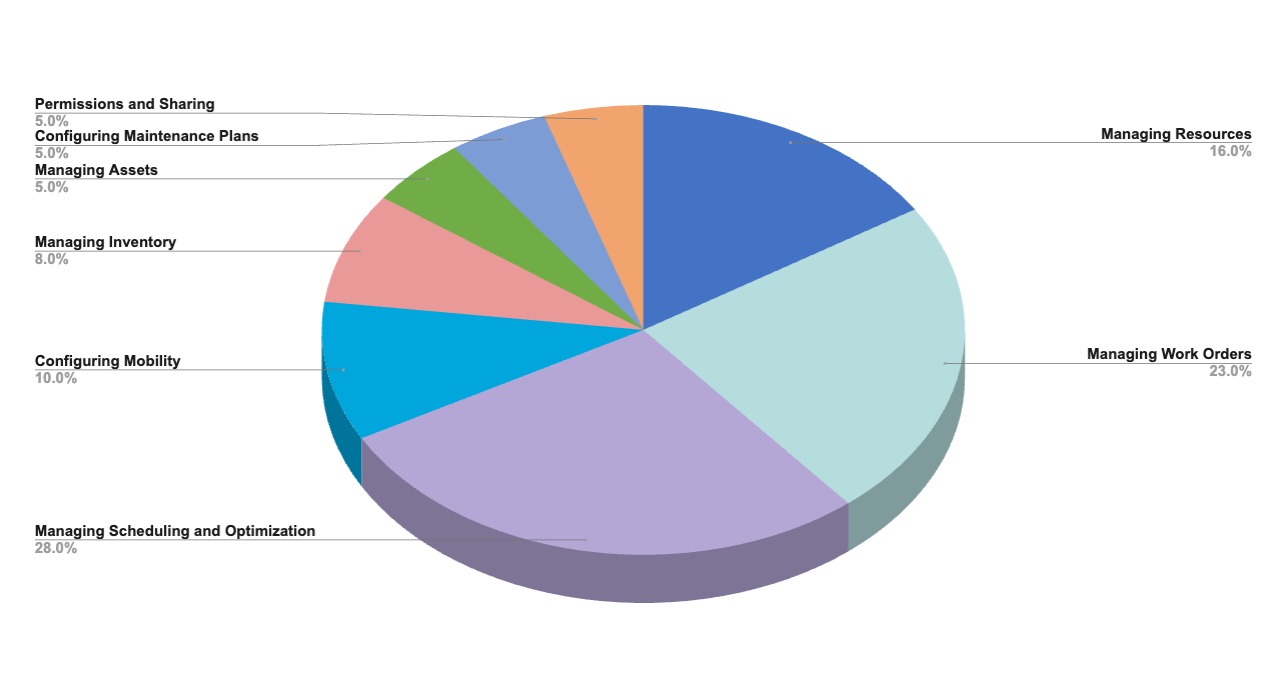
Field Service Consultant Topic Weighting Chart
Field Service Consultant
Certification Contents
The following are the core topic areas of the Field Service Consultant certification and what you’re expected to know:
Managing Resources 16%
This section covers the essentials of resource management within Salesforce Field Service, focusing on the efficient setup and management of crews, resource types, and service territories. It delves into the importance of matching skills and operating hours to work orders and appointments, ensuring the right resources are deployed effectively. This part also highlights the significance of understanding different field service license types and when to deploy them.
✔ Determine how and when to set up different resource types.
✔ Given a scenario, recommend the appropriate Service Territories and their Members.
✔ Explain the relationships between time sheets, timesheet entries, service resources, and Work Orders.
✔ Demonstrate how to use skills, skill levels, and time-based skills.
✔ Show how to use operating hours for service resources, accounts, work orders, and booking appointments.
✔ Distinguish between field service license types and when to deploy them.
Managing Work Orders 23%
Understanding work order management is crucial for streamlining field service operations. This section explores configuring work order processes, applying products and services, and managing work order line items and milestones. It guides on selecting appropriate resource preferences and establishing relationships between service appointments, work orders, and line items, ensuring comprehensive management of service delivery from initiation to completion.
✔ Given a scenario, choose the appropriate Resource Preferences.
✔ Apply Products Required to a Work Order.
✔ Analyze how and when to use Work Order Line Items.
✔ Illustrate how to configure Work Order Milestones.
✔ Given a scenario, recommend the appropriate relationship between Service Appointments, Work Orders, and Work Order Line Items.
Managing Scheduling and Optimization 28%
Scheduling and optimization are at the heart of effective field service management. This segment focuses on configuring and applying various scheduling policies, managing service appointments, and executing complex work. It covers the nuances of different scheduling and dispatch strategies, including the use of aerial versus street-level routing and the importance of optimization services in enhancing service efficiency and customer satisfaction.
✔ Given a scenario, choose the appropriate action to manage a Service Appointment.
✔ Given a scenario, apply the appropriate life cycle of a Service Appointment required to execute a Work Order
✔ Decide on the appropriate Schedule Policy to achieve the business requirements.
Configuring Mobility 10%
Mobile capabilities are pivotal in extending Salesforce Field Service’s functionality to field technicians. This section emphasizes configuring the Field Service mobile app to support key business processes, ensuring technicians can execute their tasks with the necessary information and tools at their fingertips. It distinguishes between the Field Service Mobile and Salesforce Mobile app capabilities, catering to specific mobile workforce requirements.
✔ Given a scenario, configure the Field Service app to support key business processes.
✔ Distinguish between Field Service Mobile and Salesforce Mobile app capabilities.
✔ Understand the available SFS Mobile settings.
Managing Inventory 8%
Effective inventory management is essential for ensuring the right parts are available for service tasks. This part of the guide discusses selecting the appropriate price book model for tracking product consumption and defines the inventory model best suited to business needs. It also explains the Return Order object model and process, underpinning the importance of maintaining accurate inventory levels and facilitating returns.
✔ Given business requirements, justify which define the applicable inventory model.
✔ Explain the Return Order object model and process.
Managing Assets 5%
Asset management is critical for maintaining an overview of the products installed at customer sites. This section outlines how to maintain and update assets and their relationships within Salesforce Field Service, ensuring assets are accurately tracked throughout their lifecycle, from installation through maintenance and beyond.
Configuring Maintenance Plans 5%
Maintenance plans play a vital role in preventive service strategies. This segment provides insights into recommending the appropriate maintenance plan based on specific scenarios, ensuring regular and efficient maintenance of assets to prevent service interruptions and extend asset lifespan.
Permissions and Sharing 5%
Understanding the permissions and sharing model within Salesforce Field Service is key to ensuring secure and efficient access to data and functionalities. This section covers the use cases for different types of Salesforce Field Service permission sets and explains how service appointments are shared with service resources, along with the distinctions between user territories and service territories, ensuring operational clarity and security.
✔ Explain how scheduled Service Appointments are shared with service resources.
✔ Understand the differences between user territories and service territories.
Using Connectors
✔ Create parameterized SQL queries for the Database connector.
✔ Retrieve data from a REST service using HTTP Request or a REST Connector.
✔ Use a Web Service Consumer connector to consume SOAP web services.
✔ Use the Transform Message component to pass arguments to a SOAP web service.
✔ List, read, and write local files using the File connector.
✔ List, read, and write remote files using the FTP connector.
✔ Use the JMS connector to publish and listen for JMS messages.
Processing records
✔ Explain how Mule events are processed by the For Each scope.
✔ Use the For Each scope to process records.
✔ Explain how Mule events are processed by the Batch Job scope.
✔ Use a Batch Job with Batch Steps and a Batch Aggregator to process records.
✔ Use connector listeners to trigger flows.
✔ Describe the features, benefits, and process to use watermarking.
✔ Use connectors with automatic watermarking capabilities.
✔ Use Persist data between flow executions using the Object Store. with automatic watermarking capabilities.
Debugging and troubleshooting Mule applications
✔ Install missing Maven dependencies.
✔ Read and decipher Mule log error messages.
Reply to a Forum topic
✔ Deploy applications to CloudHub.
✔ Use CloudHub properties to ensure deployment success.
✔ Create and deploy API proxies.
✔ Connect an API implementation to API Manager using autodiscovery.
✔ Use policies, including client ID enforcement, to secure an API.
✔ Create SLA tiers and apply SLA based policies.