



Platform Integration Architect

The Platform Integration Architect Certification is a credential developed for Salesforce professionals who have knowledge, skills, and experience implementing integration solutions on the Salesforce platform and are looking to verify their expertise to further advance their career in this area.
Key facts
This information will assist you if you’re interested in becoming Platform Integration Architect certified and includes an overview of the core topics in the exam.
There are 6 areas of knowledge that are covered by the Salesforce Platform Integration Architect certification.
They are covered by the Platform Integration Architect training, but if you are not able to attend, then you will need to ensure you know the areas listed below well.
Data table
| Objective | Weighting |
| Build Solution | 23% |
| Design Integration Solutions | 28% |
| Evaluate Business Needs | 11% |
| Evaluate the Current System Landscape | 8% |
| Maintain Integration | 8% |
| Translate Needs to Integration Requirements | 22% |
Platform Integration Architect Certification Contents
The following are the core topic areas of the Platform Integration Architect certification and what you’re expected to know:
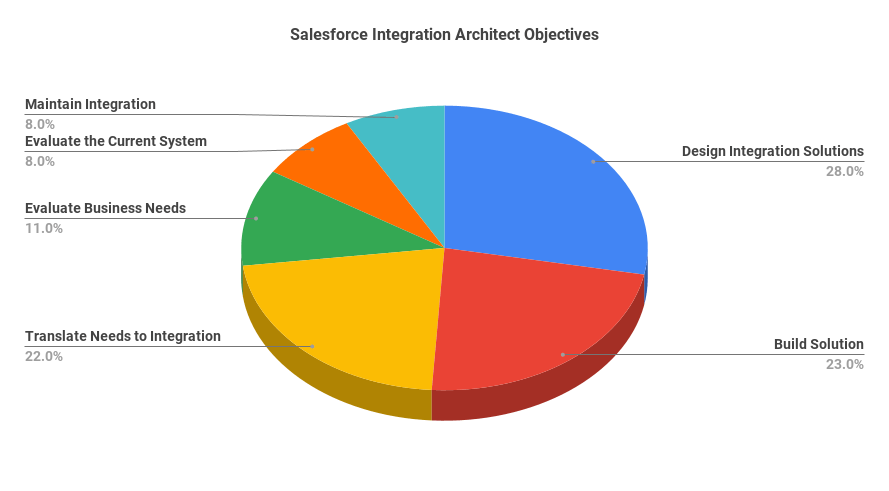
Platform Integration Architect Topic Weighting Chart
Platform Integration Architect Certification Contents
The following are the core topic areas of the Platform Integration Architect certification and what you’re expected to know:
Evaluate the Current System Landscape
This topic includes the following objectives:
A system landscape may consist of constraints and/or pain points that can negatively affect integration solutions. For instance, if the custom logic defined in an Apex class that performs a SOAP callout to an ERP system is incorrect, the integration can cause errors in the ERP system.
Salesforce features such as organization-wide defaults, profiles, permission sets, and automated business processes may need to be assessed to identify any constraints or pain points that can be eliminated.
A system landscape represents an IT infrastructure and illustrates how servers, clients, external applications, and other systems relate with each other. System integration requires authentication and authorization to allow and secure communication between independent systems. Salesforce supports different protocols and provides several tools to allow various types of integration with their multi-tenant platform.
This section covers basic concepts related to authorization and authentication for external systems integrated with Salesforce, and describes, namely, the topics such as Named Credentials, OAuth 2.0, Connected Apps, and Certificates & Keys.

Evaluate Business Needs
This topic includes the following objectives:
Laws and regulations such as the GDPR, LGPD, and PIPL can affect the choice of integration solutions. For instance, to comply with the GDPR, it may be necessary to delete customer data stored in Salesforce when it is no longer needed.
An architect should also take into account certain considerations while designing integration solutions based on business factors and regulations. One of the important design considerations is that the integration solution should be based on the company’s interpretation of the regional law(s).

Translate Needs to Integration Requirements
This topic includes the following objectives:
REST/SOAP API can be invoked from a remote system to create, update or delete 200 records at a time. If a data load for data synchronization with a remote system requires processing of more than 2,000 records, the use of Bulk API 2.0 can be considered. Synchronous Apex callouts are suitable for small volume, real-time activities. Salesforce Connect can be used to give users real-time access to data.

Design Integration Solutions
This topic includes the following objectives:
The integration pattern called Remote Process Invocation – Request & Reply is used when Salesforce needs to perform a synchronous callout to a remote system and wait for a reply. Remote Process Invocation – Fire & Forget is used to send information to a remote system when an immediate response is not required. Batch Data Synchronization is used for exporting, transforming and loading data between Salesforce and a remote system. Remote Call-In is used when a remote system needs to perform an API call to Salesforce to retrieve, create, update, or delete data. Data Virtualization is used to give Salesforce users access to data stored in a remote system. UI Update Based on Data Changes focuses on the use of Streaming API to update Salesforce UI whenever an event occurs. The Publish/Subscribe pattern involves the use of platform events, which can be used by Salesforce and a remote system to communicate events.
Various native features are available for building an integration solution, such as REST API, SOAP API, Platform Events, Apex Web Services, Salesforce Connect, etc. Each solution consists of certain components or resources that are used to connect the systems and process data. For example, using Enhanced External Services requires registering an external web service using a JSON-based API spec, which generates invocable actions that can be used in a flow built using Flow Builder.
Limitations that can affect an integration solution include governor limits, such as the maximum size of an HTTP response, and lack of support for the required capabilities or standards. Constraints can make it necessary to consider an alternative solution. For example, if a company does not have the resources for programmatic development, it may be necessary to choose a declarative solution.
Bulk API 2.0 is based on REST and is used to process large sets of data. It can be used to insert, update, upsert, or delete hundreds of thousands of records. Streaming API is a subscription-based mechanism based on CometD that enables real-time streaming of event messages.
Certain security considerations also apply to integration solutions. For example, an OAuth trust must be established for using one of the Salesforce APIs, such as REST or SOAP API.
The technique or calling mechanism used for an integration solution is affected by the requirement. For example, if a remote process needs to be triggered from a user interface in Salesforce, an enhanced external service invoked from a flow, a Lightning component, or a Visualforce page can be used as the calling mechanism.
Build Solution
This topic includes the following objectives:
Enhanced External Services or REST/SOAP callouts can be used to invoke an external API. Considerations related to authentication, data format, and schema definition are applicable to the use of an external service. Various governor limits, such as the maximum number of callouts allowed in an Apex transaction, apply to REST/SOAP callouts
Various considerations apply for using an outbound integration technique. For example, a remote site setting must be created to make a REST or SOAP callout using Apex code. A named credential must be defined for invoking an external service action from a flow. Outbound Messaging can be configured to send a session ID to allow the external system to make callbacks.
In this topic, error handling mechanisms related to these integration options will be covered as well as use cases that illustrate how they’re implemented in real-world scenarios.
Salesforce also provides recommendations for securing an integration solution where the org performs outbound calls to the external application such as data encryption, 2-way SSL, etc. In this topic, related features, recommendations, and considerations as well as use cases will be covered.
Ongoing state tracking using keys can be considered for various integration solutions. For example, when using batch data synchronization, Salesforce can store the unique ID returned by the remote system, and prior to performing any operations in the future, the ID can be checked to avoid record duplication.
Reliable messaging is also an important consideration for ensuring resilience in certain types of integration solutions. For example, when using REST API or SOAP API, the remote system should implement a reliable messaging system for timeout and error handling scenarios.

Maintain Integration
This topic includes the following objectives:
Salesforce provides tools that can be used to evaluate performance of the org, its applications, or pages. These tools can be used to monitor specific attributes and metrics related to integration solutions such as integration user logins, API requests, outdated API versions, and others. In this topic, tools such as Event Monitoring, real-time events, and Salesforce Optimizer will be covered to identify their capabilities and determine how they can be used to meet performance monitoring needs in integrated solutions.
The strategy used for error handling, escalation, and recovery in an integration solution depends on the integration pattern. For instance, when an integration is based on the Remote Process Invocation – Request & Reply pattern, the caller (e.g., a synchronous Apex REST callout) should manage error handling. A suitable recovery mechanism is also important to consider in an integration solution design. In most cases, a custom retry mechanism can be implemented if quality-of-service requirements dictate it.
This section takes a more in-depth look into Event Monitoring and Real-Time Event Monitoring to cover other general events that can be captured in an org environment that is integrated with another system. While Event Monitoring store events in event log files when resources are available, Real-Time Event Monitoring can stream and/or store events in near-real time. Furthermore, a transaction security policy can be created to intercept a real-time event and determine its next course of action.
The event information at the object and schema level will be described in order to provide a clearer picture of how granular the captured details are that enable for more efficient monitoring and can meet even complex reporting needs.